According to Fly.io’s load balancing documentation:
• Send traffic to the least loaded, closest Machine
• If multiple Machines have identical load and closeness, randomly choose one
In my case, I’ve launched two instances with identical specs in the same region. Based on the description above, I’d expect traffic to be distributed roughly evenly between them.
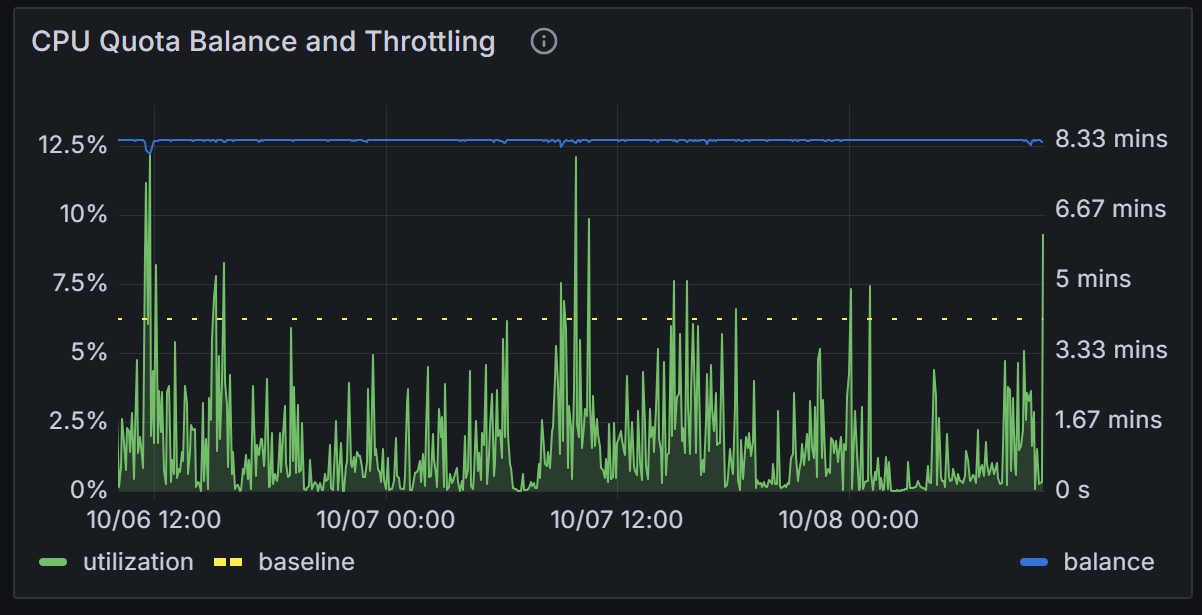
However, my observation says otherwise — one instance is consistently favored over the other. Over the last three hours (one example of many occurrences), its CPU usage and CPU balance credit consumption are clearly higher, suggesting it’s receiving roughly twice the number of requests as the other instance.
This isn’t a high-traffic app — it’s a data analytics service with very few users but relatively heavy CPU use. Still, the imbalance seems significant enough to question how “least loaded” and “random” selection are actually determined in this scenario.
Has anyone else seen this kind of uneven distribution? Or is there something specific about how Fly’s load balancer measures “load” that could explain this behavior?
Hi @bachree, Fly’s proxy balances load based only on “how many connections this instance is currently handling”. The proxy may send new connections / requests to a machine so long as it is handling connections / requests below its hard_limit.
As of why there seems to be this imbalance for your app, it really depends on how exactly your app works, because as mentioned above, the proxy has no knowledge of more fine-grained metrics like how much CPU your app is currently consuming. If, for example, your app works by having clients trigger some heavy background computation via an HTTP request, but then they disconnect, then from the proxy’s point of view, your app is now completely idle and ready to accept new requests, even if there might be a background process triggered by the request still running. If some requests trigger more heavy background computation than others, then it is entirely possible for your app to get into a state like this. Our load balancer is optimized for apps where a request’s resource consumption is confined to the duration of the request itself, and that each request consumes more or less the same amount of processing power.
If your app does work like the “unoptimized” case above, one way to mitigate this is to have something inside your machine monitor CPU usage, and start issuing fly-replay: elsewhere once the CPU consumption hits a certain target. The fly-replay here acts like a signal to tell the proxy “I can’t handle any more requests even though I might be under hard_limit, please try somewhere else”. Here’s documentation on how fly-replay works.
Thanks for the detailed explanation — the fly-replay info is very useful.
In this case, all requests are fully processed within the request–response cycle; there’s no background computation happening after the response is sent. What’s interesting is that it’s consistently the same machine that ends up handling more requests and consuming more CPU credits.
I’ll take another look at the hard_limit configuration, but at the moment it’s still unclear why one instance keeps being favored over the other despite identical setup and workload.
Do you mind sharing the name of your app? We may be able to have a look from our side as well.
I don’t mind sharing it but I can’t figure out how to send a private message.
The community forum doesn’t have DMs enabled. You could send your app name to peter at fly dot io if you don’t feel comfortable sharing it publicly on community. If we do find something we’ll still provide updates here.
Just sent it your way. Thank you!
Same app, last 24 hours, two machines:
Last 48 hours
instance 1
instance 2
From this point on, the load on the app will go to near 0 until we have another project that relies on this service around the clock.
We took a look at your machine from yesterday up until around now – it seems that the traffic pattern is mostly 1 - 2 concurrent requests at once. Because most of the time both machines have 0 or near 0 load (from the proxy’s point of view, because it only looks at concurrent requests), it is free to send requests anywhere most of the time. One of the machines coincidentally gets sorted higher than the other in the internal list we use at this step, and this is why it seems to keep getting picked.
If 1 - 2 concurrent requests is enough to cause CPU throttling, my suggestion would still be to tune your soft/hard limits and maybe even implement your own in-machine monitoring to start rejecting requests with fly-replay once you observe high CPU load. We’re also going to look into shuffling the list on balancing so that in this specific case we do round-robin between the two instances better – however, this cannot really replace soft/hard limit tuning.
That makes sense — I agree that shuffling the instance list during balancing would help distribute traffic more evenly in low-concurrency cases.
My only concern with relying on fly-replay when running two instances is the potential for requests to bounce back and forth once CPU load gets near the throttling threshold. We already monitor the instances closely, so if throttling does occur we’d scale out rather than redirect requests. Ensuring that the proxy performs true random distribution in low-load scenarios would definitely help stabilize performance.
The proxy sets fly-replay-src for a replayed request, so your machines could reject a request (or handle it anyway) if it it knows the other machine can’t (from the fly-replay-src header). The proxy also wouldn’t allow a request to be replayed infinitely, as that’ll cause unnecessary load on our side too.
Shuffling the machine list will for sure help in this case and this is what we’re going to look into. There are other cases where this kind of imbalance can happen at low load, though – there’s a small but non-negligible delay before each proxy instance learns about your machine’s load, and if your app mainly serves short-living requests, it is very hard for each proxy to have an accurate view of the exact load numbers when they are low. A proxy might think one of your machines has higher load but in reality a request might have just finished, and the other machine has just accepted a request. Depending on exactly where your machines land within our fleet of physical servers, this might result in this kind of imbalance at low load from a myriad of factors, ranging from network latency to exactly how fast each CPU runs.
For this reason, when serving short-living but heavy requests, we’d still recommend setting up some kind of system inside the machine to start rejecting requests when CPU is near full. You may also combine this with our metrics-based autoscaler to automatically scale out when throttling happens.