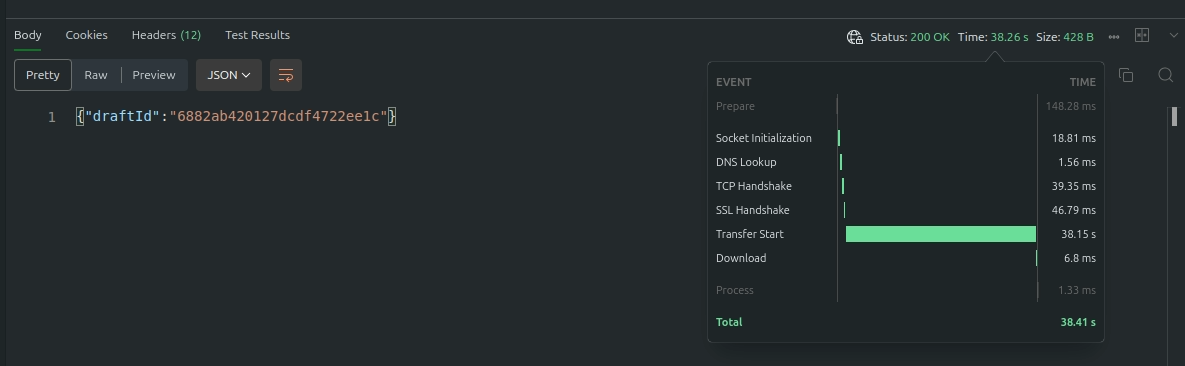
When my machine is put into suspend mode due to inactivity, the first request that triggers the wake up takes a long time to be returned (or never returns) to the user
The logs actually show the machine waking up correctly:
2025-07-25 10:15:50.980
machine became reachable in 6.717712ms
2025-07-25 10:15:50.974
machine started in 223.935944ms
2025-07-25 10:15:50.972
Machine started in 218ms
2025-07-25 10:15:50.839
2025-07-24T22:15:50.839963167 [01K0Z6JEQ0E2TWFP5712F38WPH:fc_api] The API server received a Put request on “/logger” with body “{"log_path":"logs.fifo","level":"info"}”.
2025-07-25 10:15:50.839
2025-07-24T22:15:50.839889975 [01K0Z6JEQ0E2TWFP5712F38WPH:fc_api] API server started.
2025-07-25 10:15:50.839
2025-07-24T22:15:50.839571880 [01K0Z6JEQ0E2TWFP5712F38WPH:main] Listening on API socket (“/fc.sock”).
But a response takes over 30 seconds, so it appears to the user that it hangs. Refreshing the page resolves the issue as the machine is awake for the next request.
I have tried using auto_stop_machines = true rather than ‘suspend’, and that seems to reliably return from the stopped state. It would obviously be better to have the same behaviour from the suspended state
I did a request with that header this morning. The fly fly-request-id was: 01K16V7AZ4ZJ1VRBT2NDS0AD7T-syd. There was also the flyio-debug header with the value:
2025-07-28 09:04:37.576
machine became reachable in 10.463414ms
2025-07-28 09:04:37.566
machine started in 212.047468ms
2025-07-28 09:04:37.564
Machine started in 206ms
2025-07-28 09:04:37.447
2025-07-27T21:04:37.447628939 [01K16SX00PT0HVST9PY8HNS3YG:fc_api] The API server received a Put request on "/logger" with body "{\"log_path\":\"logs.fifo\",\"level\":\"info\"}".
2025-07-28 09:04:37.445
2025-07-27T21:04:37.445903630 [01K16SX00PT0HVST9PY8HNS3YG:fc_api] API server started.
2025-07-28 09:04:37.445
2025-07-27T21:04:37.445614085 [01K16SX00PT0HVST9PY8HNS3YG:main] Listening on API socket ("/fc.sock").
2025-07-28 09:04:37.445
2025-07-27T21:04:37.445436032 [01K16SX00PT0HVST9PY8HNS3YG:main] Running Firecracker v1.12.1
2025-07-28 09:04:37.353
Starting machine
2025-07-28 08:48:09.628
Virtual machine has been suspended
Does your app need to talk to some external resource (e.g. a database) to serve such request? If so, it could be that there are connections to the external resource in the pool that are already dead (because the machine was suspended), but it takes a while for the TCP/IP stack/client libraries to realize that once the machine is resumed.
Could you add some logs to make it easier to understand where the app spends the time while serving the request?
Where is your MongoDB instance located, and is it a managed service e.g. with MongoDB Atlas? What language are you using for your web app? What library are you using for your Mongo connections? Per the advice from @pavel, is there a way in your connection library to force a new connection?
The MongoDB is hosted externally on Atlas. The web app is Node.js (Express). The Connection library uses the standard mongodb node driver.
I guess I can alter the connection options (e.g. connectTimeoutMS) however, if I lower it too much I will get false positives during normal network issues, and I am not sure what impact this will have.
Is there a recommended way to handle the reconnect after waking up from a suspended state?
I think this problem would benefit from some experimentation.
I would start by putting a Mongo test script on a machine, suspending the machine, waking it up, then running the script. It would be interesting to see if the script returns a result immediately, or it has the same problem. If it works flawlessly, then Node may be caching connections, and thus it may be worth working out how to invalidate them on wake.